How to Block a Buyer on eBay (2026 Seller Guide)
Verified 2026-10-08
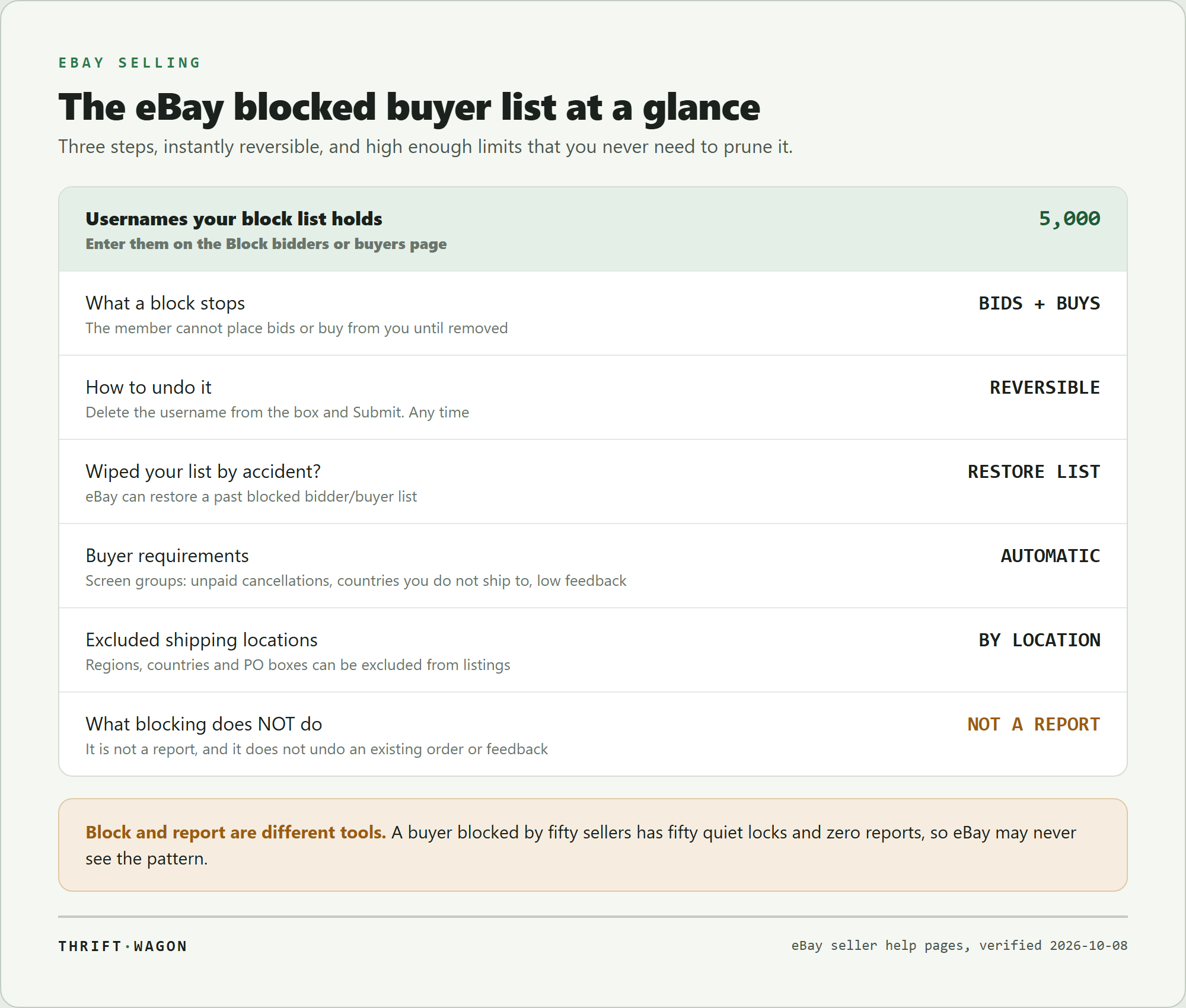
To block a buyer on eBay, open the Block bidders or buyers from your listings page, type their username into the box, and select Submit. They can no longer bid on or buy your items until you take them off the list, and the list holds up to 5,000 usernames. This guide covers the exact steps, the buyer requirements that screen whole groups automatically, and the problems blocking does not solve.

Key takeaways
- Blocking is instant and reversible: add a username to the list and that member cannot bid on or buy from you until you remove them.
- Your blocked buyers list holds up to 5,000 usernames, so there is no practical reason to clear out old entries.
- Buyer requirements are the more powerful tool: they screen groups, such as buyers with excessive unpaid cancellations or buyers in countries you do not ship to.
- You can also exclude specific shipping locations, including regions, countries, and PO boxes, from your listings.
- Blocking stops bidding and buying. Rule-breaking behaviour is a separate process: eBay has a dedicated flow to report an issue with a buyer.
How to block a buyer on eBay
eBay gives sellers direct control over who can bid on and buy their items. The individual block takes about fifteen seconds.
- Go to the Block bidders or buyers from your listings page in your eBay account.
- Enter the buyer’s username in the text box. You can add up to 5,000 usernames.
- Select Submit.
That is the whole process. eBay’s own description of the effect is direct: if you have had an issue with a buyer and do not want them to purchase or bid on your items, you can add them to your Blocked buyers list and "they’ll be unable to place bids or buy from you until you remove them from the list."
The list is one text box
The blocked buyers list is not a per-buyer toggle buried in each transaction, it is a single editable field of usernames. That has two consequences worth knowing. Adding someone means appending their username, and removing someone means deleting that username from the box and submitting again.
It also means you should keep your own note of who you blocked and why, because the list itself stores no reasons, no dates, and no transaction links.

What blocking a buyer actually does
A block is a purchase lock, not a ban from the platform. The blocked member keeps their eBay account and can buy from every other seller. What changes is their access to your listings: no bids, no purchases.
From the buyer’s side it is visible. eBay tells buyers that "if a seller blocked you from bidding on their listings, you’ll receive a notification when you try to place a bid." So a blocked buyer who tries to bid learns that they have been blocked, though eBay does not hand them a reason.
What it does not undo
Blocking is forward looking. It does not cancel an order that already exists, it does not remove feedback that has already been left, and it is not a complaint. If the problem is that a buyer broke eBay’s rules, blocking them protects your future listings while leaving the actual report unmade.
That split matters. eBay maintains a separate process to report an issue with a buyer, and a separate process for feedback problems. Blocking is the quiet, immediate, self-service piece: it stops the next bad transaction rather than resolving the last one.
How many buyers can you block on eBay?
Up to 5,000 usernames. That ceiling is high enough that most sellers will never approach it, which changes how you should treat the list.
There is no reason to prune entries to make room, and no reason to debate whether a buyer was bad enough to keep blocked. A seller doing a few hundred orders a month who blocks a buyer after every genuinely bad transaction will take years to get near the limit.
The restore option
eBay includes a safety net for the one real risk of a single-text-box list, which is wiping it by accident. Its tip on the page: "You can restore a past blocked bidder/buyer list by selecting Restore list."
If you paste over your list, delete the wrong block, or submit an empty box, that option is what gets your previous list back. Worth knowing before you need it.
Keep your own record
Because the list holds usernames only, most high-volume sellers keep a simple spreadsheet beside it: username, date, order number, and the one-line reason. It takes seconds per entry and turns an anonymous wall of names into something you can audit later.

How to unblock a buyer on eBay
Unblocking uses the same page and the same submit button:
- Go to the Block bidders or buyers from your listings page.
- Delete the username of the member from the text box.
- Select Submit.
eBay is explicit that you can remove a buyer from your list at any time, so a block is never permanent unless you leave it alone.
When unblocking is reasonable
There are a few cases where it is the right call. A buyer blocked during a dispute that was later resolved in good faith. A username blocked because of a payment failure that turned out to be a card problem. Or a block you added in frustration and would not defend a month later.
When it is not
A polite message asking to be unblocked is not evidence that the original problem has gone away, and sellers should be wary of unblocking because they were asked nicely. If the block followed non-payment, abusive messages, or an attempt to take the deal off eBay, leaving it in place costs you nothing. The buyer has the rest of the marketplace.
Buyer requirements: blocking groups instead of individuals
Blocking usernames is reactive. Buyer requirements are the preventive version, and for most sellers they do more work than the block list ever will.
eBay lets you "choose to block buyers based on certain criteria," and gives two examples that cover the two most common seller headaches: "buyers living in a country you don’t ship to, or buyers with excessive canceled orders because they didn’t pay for items."
That second one is the important one. A buyer with a pattern of unpaid cancellations is the single most predictable source of a wasted auction, and the requirement screens them out before they ever bid, with no action needed from you.
Sellers can also exclude buyers by feedback profile. eBay notes, in its explanation of buying limits to buyers, that sellers "can block buyers with low feedback scores or buyers they no longer wish to do business with."
You set these in your Selling preferences, under Buyer requirements. Unlike the block list, requirements apply to everyone who matches, now and in the future, which is why they are worth configuring once properly rather than tuning after each bad sale.
Excluding shipping locations from your listings
A related control solves a different problem: buyers who can bid but should not, because you cannot reasonably ship to them.
eBay states that sellers "can also choose to exclude specific postage locations (regions, countries, PO boxes) from your listings."
This is the clean fix for several recurring situations:
- Countries you do not ship to. Excluding the location is better than blocking individual buyers from it one at a time.
- PO boxes. Useful for sellers whose carrier or insurance terms do not cover them, or for high-value items where a physical address matters.
- Regions with poor delivery outcomes for the kind of item you sell, where undeliverable or lost parcels keep turning into refunds.
It is also a courtesy. A buyer who cannot complete a purchase learns that before committing, rather than after paying, and you avoid the cancellation that would otherwise follow.
The trade-off is real: every exclusion narrows your buyer pool. Exclude what genuinely costs you money, not everything that feels like a risk.

Block, report, or both?
These are different tools and they are not alternatives.
Block when you simply do not want to deal with that person again. No justification needed, nothing to prove, takes seconds.
Report when the buyer broke eBay’s rules. eBay runs a dedicated flow for this, described in its own words: "If you’re having a problem with a buyer because they’re not following our rules, let us know and we’ll look into it." Behaviour in that category includes demanding things outside the listing terms, abusive messages, attempts to move the transaction off eBay, and the various flavours of refund abuse.
Do both in most serious cases. Reporting creates the record eBay needs to act across the marketplace. Blocking protects you today, regardless of whether the report goes anywhere.
The mistake sellers make is treating a block as a complaint. It is invisible to eBay’s enforcement side. A buyer blocked by fifty sellers for non-payment has fifty quiet locks and zero reports, so eBay may never see the pattern that each of those sellers saw individually.

What blocking does not protect you from
Being clear about the gaps is what keeps a block list from becoming false comfort.
- Orders already placed. A block does not reach backwards. If an order exists, it runs its course through the normal cancellation, return, or dispute process.
- Feedback already left. Blocking a buyer does not remove their comment. Feedback problems have their own revision and removal processes.
- Messages. eBay documents the blocked buyers list in terms of bidding and buying. Treat contact as a separate matter, handled through reporting rather than through the block list.
- New accounts. A blocked username is one username. Nothing in the tool identifies a returning buyer who signs up again, which is exactly the gap buyer requirements close better than individual blocks do.
The realistic expectation is this: blocking removes a specific person’s ability to buy from you, immediately and reversibly. Everything else, enforcement, feedback, refunds, is somewhere else in eBay’s system.
Does blocking buyers hurt your sales?
Individual blocks, essentially never. Buyer requirements, sometimes, and that is the one to watch.
Removing a handful of problem buyers from a pool of millions costs you nothing measurable. The calculus changes when you start screening groups, because requirements are blunt by design.
Set them too tightly and you lose good buyers along with the bad ones. A requirement that excludes everyone with a low feedback score also excludes every genuinely new buyer on eBay, including the ones who would have paid immediately and left you a five-star rating.
A reasonable default for most sellers:
- Switch on the unpaid-cancellations screen. The buyers it removes cost you real money in relisted auctions and wasted time.
- Switch on location exclusions that match where you actually ship.
- Be cautious with feedback-score screens, especially if you sell inexpensive items where new buyers start.
The honest trade-off is between protecting a few sales and quietly declining others, and only you can see which side of that your category sits on.

So, should you block that buyer?
If you are asking, yes. A block is free, instant, reversible, and invisible to the rest of your business, and your list has room for 5,000 of them.
The workflow that scales:
- Block the username the moment a transaction goes badly, while you still remember why.
- Note it in your own record: username, date, order, one line of reason.
- Report separately if the buyer broke a rule, because the block does not tell eBay anything.
- Configure buyer requirements once so the predictable problems, unpaid cancellations and countries you do not ship to, never reach your listings.
- Leave old blocks alone. You will not run out of space, and reviewing them has no upside.
Sellers tend to arrive at this the hard way, after a second bad order from a buyer they had already decided to avoid. Two minutes in Selling preferences and a habit of blocking on the day prevents most of that, and it is the rare piece of eBay admin that stays done.
Frequently asked questions
How do I block a buyer on eBay?
Go to the Block bidders or buyers from your listings page, enter the buyer’s username in the text box, and select Submit. The change is immediate: that member cannot bid on or buy your items until you remove them from the list. You can add up to 5,000 usernames.
How many buyers can I block on eBay?
Up to 5,000 usernames on your blocked buyers list. That ceiling is high enough that most sellers never need to remove old entries to make room, so you can treat a block as permanent unless you decide otherwise.
Does a buyer know they have been blocked?
They find out if they try to buy. eBay tells buyers that if a seller has blocked them from bidding on their listings, they will receive a notification when they try to place a bid. eBay does not tell them which seller’s reasons were behind it.
Can I block buyers who do not pay?
Yes, as a group rather than one at a time. In Selling preferences, buyer requirements let you block buyers based on criteria including excessive canceled orders because they did not pay for items. That screens the pattern automatically instead of waiting for each buyer to cost you a sale.
How do I unblock a buyer on eBay?
Open the same Block bidders or buyers from your listings page, delete that username from the text box, and select Submit. You can remove a buyer at any time. If you wipe the list by mistake, eBay’s Restore list option brings your previous list back.
Is blocking a buyer the same as reporting them?
No. Blocking is a private purchase lock on your own listings and tells eBay nothing. Reporting goes through eBay’s report an issue with a buyer flow and is what creates a record for enforcement. For rule-breaking behaviour, do both: report it, and block them so the next listing is safe.
What sellers are reporting
Sellers repeatedly report that the single most valuable setting is the unpaid-cancellations buyer requirement rather than the username block list, because it prevents the wasted auction instead of reacting to it.
members of the r/eBaySellerAdvice community, community post
Sellers frequently note that because the blocked buyers list is a single text field with no notes or dates, they keep their own spreadsheet of who was blocked and why, and warn others about accidentally overwriting the list.
members of the r/Flipping community, community post
What this guide does not cover
This guide covers the seller-side blocking tools on eBay.com in the US: the blocked buyers list, buyer requirements, and excluded shipping locations. It does not cover eBay’s internal enforcement decisions, feedback removal criteria, or Managed Payments disputes, and the exact buyer requirement options available can differ by account and site.
Sources
- Sellers can block individual buyers or set buyer requirements, and a blocked buyer is unable to place bids or buy until removed from the list. (eBay Help)
- To block a buyer, go to the Block bidders or buyers from your listings page, enter the buyer’s username, and select Submit. You can add up to 5,000 usernames. (eBay Help)
- A past blocked bidder or buyer list can be restored by selecting Restore list. (eBay Help)
- To unblock a buyer, delete the username from the text box on the same page and select Submit. A buyer can be removed at any time. (eBay Help)
- Sellers can block buyers based on criteria such as buyers living in a country they do not ship to, or buyers with excessive canceled orders because they did not pay for items. (eBay Help)
- Sellers can exclude specific postage locations, including regions, countries, and PO boxes, from their listings. (eBay Help)
- Sellers can block buyers with low feedback scores or buyers they no longer wish to do business with, and a blocked buyer receives a notification when they try to place a bid. (eBay Help)
- eBay runs a separate process for reporting a buyer who is not following its rules. (eBay Help)