How to Sell Digital Downloads on Etsy (2026 Guide)
Verified 2026-08-12
You sell digital downloads on Etsy by creating a listing, uploading the file (or files), and marking it as an instant download, so Etsy delivers it to the buyer automatically the moment they pay. There is no shipping, no packaging, and no extra digital fee, which is why margins are high, often 80 percent or more of the sale. This guide covers setting up an instant download, file types and limits, the fees, selling Canva templates, and getting your listings found.

Key takeaways
- A digital download is delivered automatically when the buyer pays, with no shipping, packaging, or postage cost.
- Etsy lets you upload up to five files per listing, each up to 20 MB, in formats like PDF, JPEG, and PNG.
- Fees are the same as physical items: $0.20 to list, 6.5% transaction, and about 3% plus $0.25 processing, with no extra digital fee.
- Because there is no cost of goods or shipping, digital downloads keep roughly 80 percent of each sale.
- Canva templates are a popular product, delivered as a PDF with a template link, but you must design original templates within Canva’s license.
What counts as a digital download on Etsy
A digital download is a file the buyer receives electronically instead of a physical item shipped to them. On Etsy there are two kinds:
- Instant download. You upload the file when you create the listing, and Etsy delivers it automatically the moment the buyer pays. No action from you per sale.
- Made to order. A custom digital item (for example, a personalized invitation) that you create for the buyer and deliver manually after purchase.
Most sellers focus on instant downloads because they are truly passive: make the file once, list it, and it can sell repeatedly with no further work and no per-order cost. Popular products include printables (planners, checklists, wall art), templates (resumes, invitations, social media kits), SVGs and cut files, patterns, and digital art.
The appeal is simple: no inventory, no shipping, no trips to the post office, and near-100 percent margin per unit. The trade-off is that digital categories are competitive, so design quality and being found matter more than anything, which the later sections cover. For a broader view of what performs, see our guide to what sells on Etsy.

How to set up an instant download
Creating an instant-download listing takes just a few steps in Shop Manager:
- Add a new listing and, under the listing type, choose Digital.
- Upload your file or files. Etsy lets you attach up to five files per listing, each up to 20 MB. You cannot publish an instant-download listing with no file attached.
- Write the listing: a keyword-rich title, tags, and a description that states exactly what the buyer receives (file format, sizes, what is and is not editable).
- Add mockup images. Since there is no physical product to photograph, your listing photos are mockups showing the design in use (a printable framed on a wall, a template on a laptop screen).
- Set your price and publish.
After that, Etsy handles delivery: when someone buys, they get an immediate download link on their Purchases page and by email. If a file is larger than 20 MB, common with high-resolution bundles, host it appropriately or split it, and many sellers deliver a small PDF that contains a link to the full files. For the full shop setup, see our guide to selling on Etsy.

File types, sizes, and delivering the files
Etsy’s digital listings accept common file types, and a little planning makes delivery smooth:
- Formats: PDF, JPEG, and PNG are the most common. PDF is the most universal, nearly every device opens it, so it is the safest choice for printables and instructions.
- Limits: up to five files per listing, each up to 20 MB. That is plenty for most printables and templates.
- Bundles over the limit: for large or multi-file products (say a big SVG bundle), deliver a PDF containing a download link to an external host, so the buyer still gets everything without hitting the 20 MB cap.
A few delivery best practices:
- Include a short instructions file (a one-page PDF) telling the buyer how to download, open, and use the product. It cuts confusion and support messages.
- Name files clearly so the buyer knows what each one is.
- Test the download yourself from a buyer’s view before you rely on the listing.
Because the buyer gets the files instantly, there is nothing to ship, so shipping never touches your margin, which is the whole advantage of digital.
Fees and margins on digital downloads
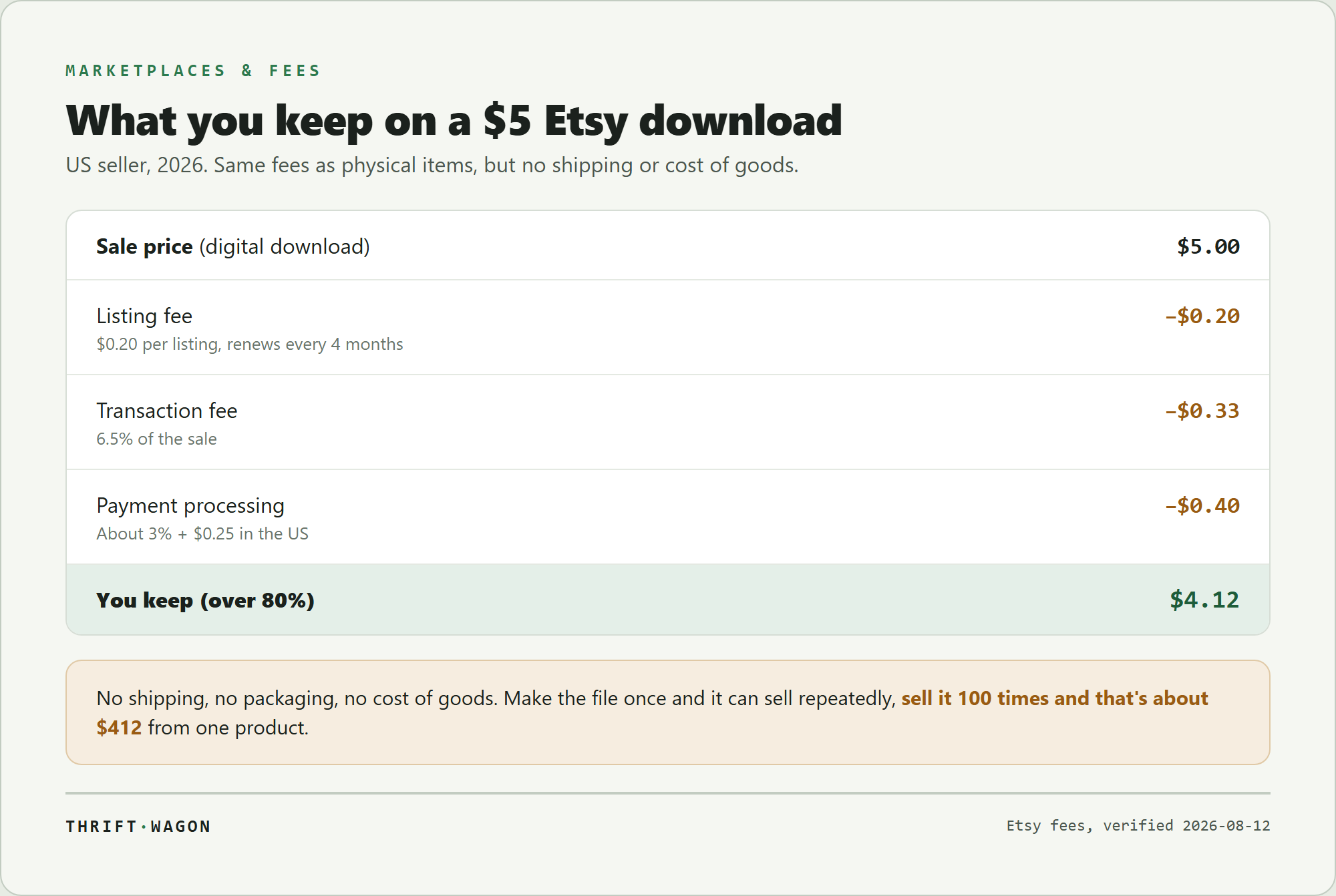
Digital downloads pay the same Etsy fees as physical items, there is no extra digital fee. For US sellers:
- Listing fee: $0.20 per listing (renews every four months or when it sells).
- Transaction fee: 6.5% of the sale price.
- Payment processing: about 3% plus $0.25 per order.
The difference is what is not there: no cost of goods, no packaging, no shipping label. So on a $5 digital download, Etsy takes roughly $0.20 + $0.33 + $0.40 = about $0.93, and you keep about $4.12, over 80 percent. Sell the same file 100 times and you have earned around $412 from a product you made once.
That high margin is the reason digital products are so popular, but it cuts both ways: competition is fierce, so pricing is less about covering costs and more about positioning. Price too low and you leave money on the table (and can signal low quality); price fairly for the value and the design. Offsite Ads (12% to 15% on attributed sales, mandatory above $10,000 a year) still apply, so factor those in at scale. For the full fee breakdown, see our guide to Etsy’s seller fees.
Selling Canva templates on Etsy
Canva templates are one of the most popular digital products on Etsy, editable designs (social media kits, planners, invitations, resumes) that buyers customize in their own free Canva account. Here is how selling them works:
- Design an original template in Canva. It must be your own design, you cannot simply resell Canva’s stock templates or elements as-is; that violates Canva’s license. Build something genuinely yours.
- Get the share link. In Canva, use Share, then the template link option, which creates a link that gives the buyer their own editable copy.
- Deliver it as a PDF. Because you cannot upload a live Canva link as a file, you deliver a small PDF on Etsy that contains the template link plus short instructions.
- The buyer opens the link, gets their own copy in Canva, and edits it.
Two cautions: respect Canva’s Content License (design original work, and note that some premium Canva elements cannot be redistributed), and be clear in your listing that the buyer needs a Canva account and that the product is an editable template, not a finished file. Done right, Canva templates are a strong, high-margin instant-download product. For where they fit among Etsy’s best sellers, see what sells on Etsy.

Frequently asked questions
How do I sell digital downloads on Etsy?
Create a listing, choose the Digital type, and upload your file (up to five files, each up to 20 MB) so it becomes an instant download. Add a keyword-rich title, tags, and mockup images, then publish. When a buyer pays, Etsy delivers the file automatically to their Purchases page and by email, with no shipping on your end.
What are Etsy’s fees on digital downloads?
The same as physical items, with no extra digital fee: $0.20 to list, a 6.5% transaction fee, and about 3% plus $0.25 payment processing. On a $5 download that is roughly $0.93 total, so you keep about $4.12. With no cost of goods or shipping, digital downloads keep around 80 percent of each sale.
What file types can you sell on Etsy?
Common formats include PDF, JPEG, and PNG, with PDF the most universal since nearly every device opens it. Etsy allows up to five files per listing, each up to 20 MB. For larger bundles that exceed the limit, deliver a PDF containing a link to the full files hosted elsewhere.
How do I sell Canva templates on Etsy?
Design an original template in Canva, then use Canva’s Share template link option to create a link that gives buyers their own editable copy. Deliver a small PDF on Etsy containing that link and instructions. You must design original templates within Canva’s license, not resell Canva’s stock templates as-is.
Are digital downloads on Etsy worth it?
They can be, because of near-100 percent margins, no inventory, and no shipping, and a file made once can sell repeatedly. The catch is that digital categories are very competitive, so success depends on original, high-quality designs and strong listing SEO rather than on undercutting on price.
How are digital files delivered to buyers on Etsy?
For instant downloads, Etsy delivers automatically: as soon as payment is confirmed, the buyer gets a download link on their Purchases page and by email. You upload the file once when creating the listing, and every buyer receives it without any action from you per sale.
What sellers are reporting
Etsy sellers repeatedly advise newcomers to deliver a PDF that contains the Canva template link rather than trying to upload the link directly, and to state clearly in the listing that the product is an editable template requiring a Canva account.
members of the r/Etsy community, community post
Digital sellers frequently report that including a short one-page instructions PDF with each product noticeably reduces support messages and negative reviews from buyers confused about how to download or edit the files.
members of the r/EtsySellers community, community post
What this guide does not cover
This explains selling digital downloads for US Etsy sellers in 2026; file limits, fees, and Canva’s license terms change, so confirm current details in Etsy’s and Canva’s help pages. It does not cover intellectual-property law for the designs you sell. This is general guidance, not legal or financial advice.
Sources
- Etsy instant-download listings let you upload files when you create the listing, up to five files per listing, delivered automatically to the buyer on purchase. (Etsy Help)
- Etsy charges a $0.20 listing fee, a 6.5% transaction fee, and payment processing, with no extra fee for digital items. (Etsy)
- Breakdown of Etsy’s seller fees, including listing, transaction, and processing fees. (Thrift Wagon)